How Much Does Website Maintenance Cost?
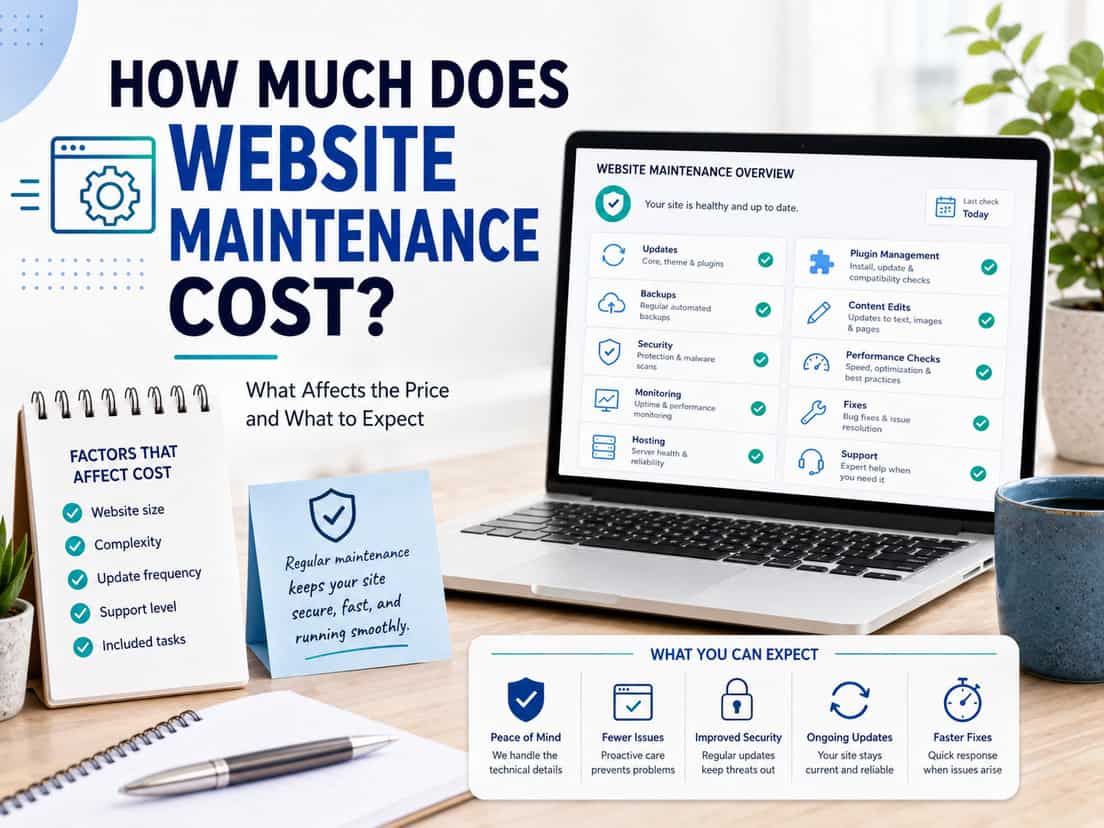
Maintenance runs from a hands-off plan where everything happens automatically to a fully managed one where someone actually checks the site each month. Both keep a site running, but they’re very different levels of service, and priced accordingly.
The biggest difference between plans isn’t the list of tasks; it’s whether a person is watching. On a basic plan, updates and security run automatically and no one checks the result. On higher plans, someone reviews the work, catches what broke, and fixes it. That distinction runs through everything below.
Almost all of this is ongoing, billed monthly rather than once. Here’s how it breaks down:
- Core upkeep (updates, backups, licenses, post-update fixes)
- Monitoring & checks (uptime, functionality, payment, links, analytics)
- Security (the protection stack)
- Performance (images, speed)
- Support & subscriber benefits (priority, content help, hosting, reporting)
- Optional add-ons (staging, live monitoring, and more)
As before, each item notes how common it is and which plan it belongs to. The plans and prices come at the end.
Core upkeep
Core upkeep is the baseline that keeps a WordPress site alive and recoverable: updates, backups, licenses, and fixing what updates occasionally break. Some of it runs on every plan; the checking and fixing is where plans start to differ.
WordPress updates
WordPress updates keep the core, plugins, and themes current, which matters for both security and stability. Outdated components are the most common way sites break or get hacked.
How this differs by plan
- run automatically every month on every plan
- on higher plans, followed by a check that the site still works
- on the basic plan, applied without that check
How common it is
Essential on any maintained site. The question is only whether someone verifies the result.
Price impact
The update itself is routine and automated. The value on higher plans is the review afterward, since an update that quietly breaks something is worse than no update at all if no one looks.
Price range
Included in every plan; the post-update check is what separates basic from the higher tiers. Most projects land in this range, but the final figure is set case by case, since too many inputs feed into it to fix one price.
Backups
Backups are regular saved copies of the site, kept off the server, so it can be restored if something goes wrong. This is the safety net the whole plan rests on.
This includes
- regular automated backups of files and database
- stored off-site (for example on managed cloud storage)
- available to restore from if the site breaks
How common it is
Essential, and included on every plan where the site is maintained. A site without backups is one bad update away from disaster.
Price impact
Backups run automatically once set up. Their real value only shows on the rare day a restore is needed, which is exactly why they’re never optional.
Price range
Included on every maintenance plan. Most projects land in this range, but the final figure is set case by case, since too many inputs feed into it to fix one price.
Software licenses
Software licenses are the paid licenses for premium plugins and themes the site relies on, which have to stay active to keep receiving updates and support.
This covers
- keeping premium plugin and theme licenses active
- ensuring continued updates and vendor support
- managing renewals so nothing lapses
How common it is
Relevant to most real-world sites, which usually run at least one or two premium tools. Included on the Standard and E-commerce plans.
Price impact
Managing licenses is light ongoing admin, but a lapsed license means a plugin stops updating, which quietly becomes a security and stability risk.
Price range
Included on Standard and E-commerce plans; license fees themselves depend on the tools in use. Most projects land in this range, but the final figure is set case by case, since too many inputs feed into it to fix one price.
Post-update fixes
Post-update fixes are repairing anything an update breaks: a layout that shifts, a feature that stops working, or a conflict between plugins.
This can involve
- spotting what an update changed or broke
- fixing layout, feature, or plugin conflicts
- restoring from backup if needed
How common it is
Included where updates are actually checked, which is the Standard and E-commerce plans. Not part of the basic plan, since that plan doesn’t review update results.
Price impact
Most updates cause no issues. When one does, catching and fixing it quickly is the entire point of a managed plan, and why higher tiers cost more than automated-only ones.
Price range
Included on Standard and E-commerce plans, as part of the post-update check. Most projects land in this range, but the final figure is set case by case, since too many inputs feed into it to fix one price.
Monitoring & checks
Monitoring is how problems get noticed, ideally before the client does. Here too the plans split between automatic logging that no one watches and active checks a person actually performs.
Uptime monitoring
Uptime monitoring is an automated service that checks whether the site is online and records any outages.
How this works by plan
- automated checks on every plan, kept as a log
- on the basic plan, the log simply records downtime
- faster, watched alerting is available as an add-on
How common it is
Included on every plan in its basic form. Useful for knowing an outage happened; live alerting is a separate upgrade.
Price impact
Basic monitoring is automated and cheap: it quietly logs when the site was down. Getting alerted the moment it happens, and acting on it fast, is the add-on version.
Price range
Basic logging included on every plan; live alerting is an optional add-on. Most projects land in this range, but the final figure is set case by case, since too many inputs feed into it to fix one price.
Functionality checks
Functionality checks are periodic manual checks that the important things still work: forms submit, SSL is valid, and the domain and hosting are in order.
This can include
- testing that forms actually send
- checking SSL, domain, and hosting status
- confirming key features still work as expected
How common it is
Included on the higher plans, where someone actually looks. Not part of the automated basic plan.
Price impact
These checks are quick but easy to skip, and a contact form that silently stopped working can go unnoticed for weeks. That’s exactly what a managed plan is meant to catch.
Price range
Included on Standard and E-commerce plans. Most projects land in this range, but the final figure is set case by case, since too many inputs feed into it to fix one price.
Payment gateway check
A payment gateway check is periodically confirming that checkout and payments actually work end to end, so a store isn’t silently losing sales.
This involves
- testing the checkout and payment flow
- confirming orders and payments go through
- catching gateway or plugin issues early
How common it is
Specific to the E-commerce plan. A broken checkout is the most expensive failure a store can have, and the easiest to miss.
Price impact
This is done periodically rather than constantly, roughly once a month and no less often than every two months, which is enough to catch a broken checkout without over-servicing it.
Price range
Included on the E-commerce plan, performed every 30 to 60 days. Most projects land in this range, but the final figure is set case by case, since too many inputs feed into it to fix one price.
Broken links
Broken link monitoring is checking for and fixing links that no longer work, whether to other pages, files, or external sites.
This can include
- scanning for broken internal and external links
- fixing or redirecting them
- keeping navigation and content intact
How common it is
Included on the higher plans. Broken links hurt both visitors and search rankings, and accumulate quietly over time.
Price impact
Scanning is quick and largely automated; the work is in fixing what turns up. On an active site, links break steadily as other pages and sites change.
Price range
Included on Standard and E-commerce plans. Most projects land in this range, but the final figure is set case by case, since too many inputs feed into it to fix one price.
Analytics access
Analytics access ranges from simply having tracking in place to actually reviewing and reporting on what the numbers say.
How this differs by plan
- basic: GA4 tracking implemented, plus a link to view the data without logging in
- higher plans: GA4 configured, monitored, and reported on
- no ongoing analysis or reporting on the basic plan
How common it is
Some form on every plan. The basic plan gets tracking in place and a view-only link; interpreting and reporting on the data is a higher-plan service.
Price impact
Putting GA4 in place is a one-time setup. The ongoing value, configuring goals, watching trends, and reporting, is separate work, which is why the basic plan stops at implementation.
Price range
GA4 implementation and a view link on every plan; configuration, monitoring, and reporting on higher plans. Most projects land in this range, but the final figure is set case by case, since too many inputs feed into it to fix one price.
Security
Security is protecting the site from being hacked, infected, or taken down, which for WordPress is a real and constant risk rather than a hypothetical one. The stack combines what the hosting provides with additional layers as needed.
Security stack
The security stack is the combination of tools protecting the site, layered according to what it needs. Some come with hosting; others are added on top.
The typical layers
- server-level protection included with hosting
- a firewall plugin added where needed
- an additional paid layer for higher-risk sites
How common it is
Included in automated form on every plan, with stronger, actively managed protection on the higher tiers. Non-negotiable for any WordPress site.
Price impact
Baseline protection runs automatically and is included. Adding and managing extra layers, and responding when something is flagged, is where the higher plans do more. Some premium security tools carry their own license cost.
Price range
Baseline included on every plan; added layers and active management scale with the plan and the site’s risk. Most projects land in this range, but the final figure is set case by case, since too many inputs feed into it to fix one price.
Performance
Performance is keeping the site fast, which affects both how it feels to visitors and how it ranks in search. Left alone, most sites slow down over time as content and images pile up.
Image optimization
Image optimization is compressing and correctly sizing images so pages load faster without visibly losing quality. Images are the most common cause of a slow site.
This can include
- compressing images without visible quality loss
- serving correctly sized and modern formats
- keeping new uploads optimized over time
How common it is
Included on the Standard and E-commerce plans. Also available as an add-on for basic-plan sites that need it.
Price impact
Setting it up is a defined job; keeping new uploads optimized is a light ongoing task. On image-heavy sites the speed difference is significant.
Price range
Included on Standard and E-commerce plans; available as an add-on otherwise. Most projects land in this range, but the final figure is set case by case, since too many inputs feed into it to fix one price.
Speed optimization
Speed optimization is the wider work of making pages load faster: caching, cleanup, and tuning beyond just images.
This can include
- caching and load-time improvements
- reducing and cleaning up bloat
- tuning for core web vitals
How common it is
Available as an add-on rather than baked into the standard plans, since needs vary a lot from site to site.
Price impact
A one-time tune-up is a defined job. Ongoing speed monitoring, watching for slowdowns and addressing them, is a separate add-on for sites where speed really matters.
Price range
Priced as an add-on, one-time or ongoing; see optional add-ons below. Most projects land in this range, but the final figure is set case by case, since too many inputs feed into it to fix one price.
Support & subscriber benefits
This is the human side of a plan: how quickly you get help, what small changes are included, and the perks that come with being on a monthly plan rather than paying per job. It’s also where hosting fits in, since it underpins everything else.
Priority support & SLA
Priority support means subscribers get help faster than one-off clients, with a shorter guaranteed response time on the paid plans.
This covers
- a shorter response time for subscribers
- priority over non-subscriber requests
- a known point of contact for issues
How common it is
A core benefit of being on a monthly plan. The response guarantee applies to subscribers, not to ad-hoc requests.
Price impact
The value here is speed and certainty: when something breaks, subscribers move to the front of the queue instead of waiting in line with everyone else.
Price range
Included with any maintenance plan; response time improves on the higher tiers. Most projects land in this range, but the final figure is set case by case, since too many inputs feed into it to fix one price.
Included content changes
Included content changes are small edits, such as swapping text or an image, covered within the plan up to a set amount of time.
This typically means
- small text and image edits
- minor content updates
- a set allowance of time per period
How common it is
Included on every plan, with a larger allowance on the higher tiers. Anything beyond the allowance is billed or added as an add-on.
Client input
The client sends what they want changed. Clear, batched requests get the most out of the included time.
Price impact
Small changes are quick, which is why a modest allowance is included. The basic plan covers a few short sessions a year; higher plans include more.
Price range
Included on every plan; basic covers roughly three short sessions a year, more on higher plans. Most projects land in this range, but the final figure is set case by case, since too many inputs feed into it to fix one price.
Subscriber perks
Subscriber perks are the extra benefits of being on a monthly plan, on top of the maintenance itself: a standing discount and light priority on new work.
These include
- a discount on other services (around 10%)
- light priority on new project requests
- an existing, ready-to-go working relationship
How common it is
Applies to anyone on a monthly plan. It’s part of what makes staying subscribed worthwhile beyond the upkeep itself.
Price impact
This isn’t a task so much as a reason to stay on a plan: ongoing clients get better rates and quicker attention on everything else they need.
Price range
Included with any maintenance plan. Most projects land in this range, but the final figure is set case by case, since too many inputs feed into it to fix one price.
Reporting
Reporting is the regular summary of what was done and how the site is doing: a key-metrics link and, on higher plans, a monthly overview.
This can include
- a one-page key-metrics link
- a monthly email summarizing maintenance done
- notes on anything that needs attention
How common it is
The basic plan includes the metrics link; a written monthly overview comes with the higher plans.
Price impact
A metrics link is automated. The monthly written overview takes a little time each cycle, but it’s how the client actually sees what they’re paying for.
Price range
Metrics link on every plan; monthly written overview on the higher plans. Most projects land in this range, but the final figure is set case by case, since too many inputs feed into it to fix one price.
Hosting
Hosting is where the site actually lives. For maintenance clients, it’s either provided directly or on a host that meets a known standard, so the environment is controlled.
How this works
- hosting provided as part of the plan, or
- the site kept on a host that meets an approved standard
- a known, controlled environment either way
How common it is
Effectively required for maintenance clients. Maintaining a site on unknown or unreliable hosting is far harder and riskier.
Price impact
A controlled hosting environment is what makes reliable maintenance possible: predictable performance, working backups, and fewer surprises. It’s the foundation the rest of the plan depends on.
Price range
Bundled with maintenance, or required to meet an approved standard; hosting-only and hosting-plus-maintenance options are outlined below. Most projects land in this range, but the final figure is set case by case, since too many inputs feed into it to fix one price.
Optional add-ons
Beyond the three plans, there’s a range of extras that can be added to any of them as needed. These aren’t bundled because not every site needs them, and it’s fairer to add them only where they’re wanted. The ones below are common examples, not the full list.
Staging & safe updates
Staging and safe updates means copying the site to a private staging environment, applying and testing updates there first, and only then updating the live site.
This involves
- a staging copy of the live site
- applying and testing updates there first
- updating live only once it’s confirmed safe
How common it is
A premium add-on for sites where downtime or breakage is costly. Overkill for a simple site, valuable for a complex or business-critical one.
Price impact
This is the safest way to update, since problems are caught before they ever reach visitors. It takes more time per update cycle, which is why it’s an add-on rather than standard.
Price range
Add-on, roughly EUR 20 to 80 per month depending on site complexity. Most projects land in this range, but the final figure is set case by case, since too many inputs feed into it to fix one price.
Paid uptime & live monitoring
Paid uptime and live monitoring upgrades the basic uptime log into active alerting, where outage notifications come straight to me so I can react as fast as possible.
This adds
- faster, more frequent uptime checks
- instant alerts sent directly to me
- a quick response when the site goes down
How common it is
An add-on for sites where downtime genuinely costs money. The basic log tells you afterward; this acts at the time.
Price impact
The difference is reaction speed: instead of noticing an outage later in a log, I’m alerted immediately and respond as soon as I can, though without a formal response-time guarantee.
Price range
Add-on, roughly EUR 15 to 50 per month depending on check frequency. Most projects land in this range, but the final figure is set case by case, since too many inputs feed into it to fix one price.
Speed monitoring
Speed monitoring is ongoing tracking of the site’s load times, so slowdowns are caught and addressed rather than left to build up.
This includes
- tracking load times over time
- flagging slowdowns as they appear
- acting before speed becomes a problem
How common it is
An add-on for sites where speed is a priority, such as stores or content-heavy sites. Pairs naturally with a one-time speed tune-up.
Price impact
A one-time optimization fixes today’s speed; monitoring keeps it from quietly degrading again as the site grows.
Price range
Add-on, roughly EUR 20 to 70 per month. Most projects land in this range, but the final figure is set case by case, since too many inputs feed into it to fix one price.
SEO keyword monitoring
SEO keyword monitoring is tracking where the site ranks for its most important search terms, so changes are noticed early.
This covers
- tracking positions for key terms
- noticing ranking drops or gains
- flagging when something needs attention
How common it is
An add-on for clients who care about search visibility but aren’t on a full SEO engagement. A light early-warning system rather than active SEO work.
Price impact
This is monitoring, not optimization: it tells you when rankings move, which is the cue to act. Doing something about it is separate SEO work.
Price range
Add-on, roughly EUR 20 to 80 per month depending on how many terms. Most projects land in this range, but the final figure is set case by case, since too many inputs feed into it to fix one price.
Extra content time
Extra content time is additional included time for content changes, beyond the small allowance that comes with a plan, for sites that update more often.
This suits
- sites with frequent content changes
- clients who’d rather prepay than be billed per job
- a predictable monthly allowance of edit time
How common it is
An add-on for anyone whose needs regularly exceed the included allowance. Turns ad-hoc billing into a predictable monthly amount.
Client input
The client sends changes as needed; batching them makes the time go further.
Price impact
For frequent updaters, a set monthly block of time is cheaper and simpler than paying per change.
Price range
Add-on, priced as a monthly block of time to suit how much the site changes. Most projects land in this range, but the final figure is set case by case, since too many inputs feed into it to fix one price.
So what does maintenance actually cost?
Maintenance is sold as monthly plans rather than one-off jobs, with a range of add-ons on top. The three plans below cover most needs, and the key difference between them is how much is automated versus actively checked by a person.
Basic (hosting-focused)
Hosting, automatic monthly updates with no post-update check, automatic security, uptime logging, automated backups, GA4 implementation with a view-only metrics link, and a few short content-help sessions a year. Everything runs automatically; no one manually reviews the site. Roughly EUR 20 to 50 per month. Most projects land in this range, but the final figure is set case by case, since too many inputs feed into it to fix one price.
Standard (managed)
Everything in Basic, plus post-update checks and fixes, functionality and broken-link checks, software licenses, image optimization, priority support with a shorter response time, configured analytics with a monthly overview, and a larger content allowance. This is the plan where a person actually reviews the site. Roughly EUR 60 to 150 per month. Most projects land in this range, but the final figure is set case by case, since too many inputs feed into it to fix one price.
E-commerce (managed + store checks)
Everything in Standard, plus periodic payment gateway checks and the extra attention a store needs, where a broken checkout is the costliest failure of all. Roughly EUR 120 to 300+ per month. Most projects land in this range, but the final figure is set case by case, since too many inputs feed into it to fix one price.
Hosting can also be taken on its own, or bundled as hosting plus maintenance, or hosting plus maintenance for an e-commerce site, which is the most common arrangement. On top of any plan, add-ons like staging, live monitoring, speed or SEO monitoring, and extra content time are added only where they’re needed.
The reason maintenance resists a single price is the same as everywhere else: an automated hosting plan and a fully managed e-commerce plan are both “maintenance,” and they’re very different amounts of work. The useful next step is a short conversation about the site and how much hands-on attention it needs.