How Much Does It Cost to Turn HTML/Figma Design Into WordPress?
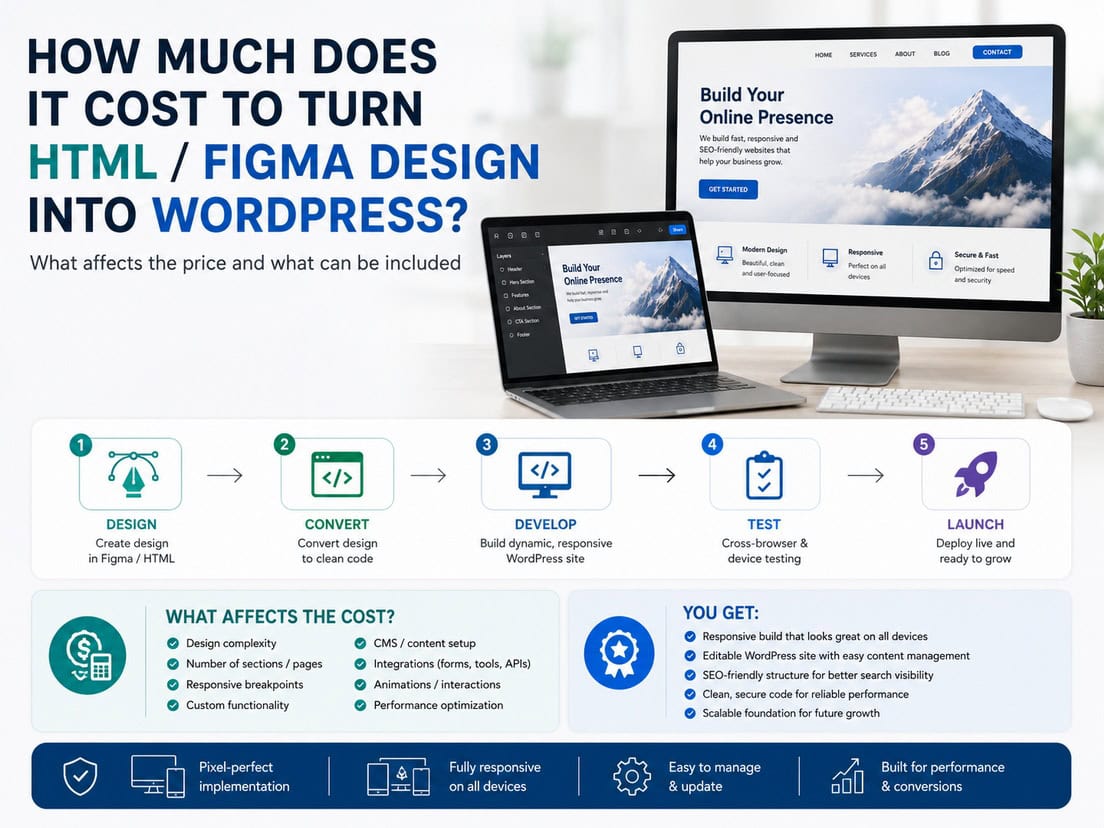
This is about taking a finished design and building it as a real, editable WordPress site using Kadence blocks, rather than a hardcoded theme. The design can come as Figma, HTML/CSS, or even something you put together yourself with a bit of AI help. Whatever the source, the goal is the same: a site that matches the design closely and that you can actually edit afterward.
A few things shape the price more than anything else, so they’re worth saying upfront:
- The source. A clean Figma file or tidy HTML is faster to work from than rough or inconsistent material.
- Very close, not pixel-perfect. The build matches the design so closely you’d struggle to tell them apart. Chasing the last 2% of absolute pixel precision roughly doubles the cost, and almost no one needs it, so it’s not the default.
- Unique layouts, not page count. Ten pages from three repeatable layouts is very different from ten unique ones. Most projects are one to ten pages.
- Responsive by default. Every build looks right across the usual range of screens, from small phones to large desktops, without you having to ask.
A note on tools: Kadence is the primary builder here, Elementor is also available, and support for more builders is coming. Instead of exact prices, each item below shows a rough level on a scale from Low to Premium (for example €€○○), since projects vary too much for fixed numbers. Here’s how the work breaks down:
- Getting started (handoff, global styles)
- Building the pages (blocks, responsive, reusable library)
- Interactivity (animations, navigation, forms)
- Dynamic content (blog, custom post types, filters)
- Handover (for editors or for developers)
Getting started
Before any pages get built, there’s the design to review and a foundation to set up. Getting this right is what makes the rest go smoothly and keeps the whole site consistent.
Design handoff & review
Design handoff and review is looking over what you’ve sent, whatever form it’s in, and checking it’s complete and consistent enough to build from cleanly.
This involves
- reviewing the Figma, HTML, or other source
- checking for missing states, sizes, or assets
- flagging anything inconsistent before the build starts
How common it is
Standard on every project. Catching gaps here saves far more time than fixing them mid-build.
Client input
The cleaner and more complete the handoff, the faster and cheaper the build. Rough AI-assembled sources need more sorting out first.
Price level
€○○○ — Low. A review pass, larger when the source is rough or incomplete.
Kadence global styles setup
Kadence global styles setup is establishing the site’s foundation: the global colours, typography, spacing, and defaults, so everything is consistent and easy to adjust site-wide.
This includes
- setting up the global colour palette and fonts
- base typography, spacing, and button styles
- site-wide defaults everything else inherits
How common it is
Essential. It’s the backbone that keeps the build consistent and makes later changes a single edit rather than many.
Price level
€€○○ — Low to Medium, depending on how detailed the design system is.
Design review & refinement
Design review and refinement is going over the design before or during the build, suggesting improvements, and cleaning up the parts that aren’t quite right, rather than just building exactly what’s there.
This can include
- reviewing the design and flagging what could be better
- tidying inconsistencies (for example, fifty near-identical greys where one or two would do)
- improving spacing, alignment, and consistency as it’s built
How common it is
Optional, and genuinely useful. Many designs, especially AI-assisted ones, have small inconsistencies worth fixing before they’re set in stone.
Options
Available as a light review, or as hands-on refinement where I improve the weak parts as I build.
Price level
€€○○ — Low to Medium, depending on how much needs refining.
Matching an existing site’s design
Matching an existing site’s design is recreating the look and structure of a site you like, used as a reference, when there’s no design file to start from.
This can include
- recreating the layout and style of a reference site
- adapting it to your own content and brand
- building it properly in Kadence rather than copying code
How common it is
Useful when you have a site you’d like yours to resemble but no design to hand over. The reference guides the look; the build is made for your own brand and content.
Client input
You point to the site you like; the closer your content and brand are ready, the smoother it goes.
Price level
€€€○ — Low to Premium, depending on how complex the reference is.
Building the pages
This is the core of the job: turning the design into actual pages built from blocks, made to work across screen sizes, and optionally packaged so you can reuse parts of it later.
Page build (Kadence blocks)
The page build is recreating each design as a real page using Kadence blocks, matching the design closely while keeping everything editable in the WordPress editor.
This involves
- building each layout with native blocks
- matching the design closely (very close, not pixel-perfect)
- keeping the structure clean and editable
How common it is
The central task of every project. Everything else supports or extends this.
Options
Basic: a few simple layouts. Standard: a typical one-to-ten-page site with some unique pages. Premium: many unique, detailed layouts.
Price level
€€€○ — Low to Premium, driven by how many unique layouts there are.
Responsive implementation
Responsive implementation is making sure every page looks right across the full range of screens, from small phones up to large desktops.
This includes
- adjusting layouts for phones, tablets, and desktops
- looking right across the usual range (small phones to large screens)
- checking real behaviour, not just resizing
How common it is
Included on every build by default. A site that only looks right on desktop isn’t finished.
Price level
€€○○ — Low to Medium, depending on how much layouts change across sizes.
Reusable patterns & global library
Reusable patterns and a global library is packaging common sections so they can be dropped into new pages, keeping things consistent and quick to extend.
This can include
- turning repeated sections into reusable patterns
- a global library you can insert from anywhere
- consistent, quick-to-reuse building blocks
How common it is
Optional, and requested more by clients who’ll keep building on the site. My builds lean on global styles rather than heavy componentization, but a reusable library is set up when it’s wanted.
Price level
€€○○ — Low to Medium, depending on how many patterns.
Interactivity
Beyond static layouts, most designs include movement and interactive elements. All of the below are possible; how much there is depends on the design.
Animations & interactions
Animations and interactions are the movement in a design: fade-ins, hover effects, transitions, and similar touches that make a site feel alive.
This can include
- scroll and load animations
- hover and interaction effects
- smooth transitions between states
How common it is
Common where the design calls for it. Light touches are quick; heavy, custom animation adds up.
Price level
€€○○ — Low to High, depending on how much animation the design has.
Navigation (mega menu, sticky)
Navigation covers the header and menus, including more involved elements like mega menus and sticky headers that stay in place as you scroll.
This can include
- header and menu build
- mega menus with richer content
- sticky or transforming headers
How common it is
Every site has navigation; the cost depends on how simple or elaborate it is.
Price level
€€○○ — Low to High, depending on menu complexity.
Forms & integrations
Forms and integrations are the interactive functional pieces: contact and signup forms, and connections to outside tools where needed.
This can include
- building and styling forms
- connecting them to email or other tools
- embedding third-party services
How common it is
Common. Most sites need at least a contact form; more involved integrations add work.
Price level
€€○○ — Low to Medium, depending on form and integration complexity.
Dynamic content
Static pages are only part of it. Many sites need content that’s generated from data, blog posts, listings, filtered results, which is where WordPress does more than just display fixed layouts. All of the below are possible.
Blog & post templates
Blog and post templates are the reusable templates that display posts: the blog listing and the single-post layout, built once and applied to all posts.
This includes
- a blog/archive listing layout
- a single-post template
- consistent styling across all posts
How common it is
Common for any site with a blog. Built once, then every post uses it.
Price level
€€○○ — Low to Medium, depending on how custom the templates are.
Custom post types & ACF
Custom post types and custom fields are structured content beyond standard pages and posts, such as portfolios, services, or listings, with their own editable fields.
This can include
- setting up custom post types
- custom fields (ACF) for structured content
- templates to display them
How common it is
For sites with structured, repeatable content beyond pages and posts. Common for portfolios, catalogs, and directories.
Price level
€€€○ — Medium to Premium, depending on how many types and fields.
Dynamic listings & filters
Dynamic listings and filters are pages that pull and display content from data, with options to filter or sort it, such as a filterable portfolio or product listing.
This can include
- query loops that display content dynamically
- filtering and sorting options
- listings that update as content is added
How common it is
For sites where content needs to be browsed or filtered rather than laid out by hand. More involved, and worth it where it fits.
Price level
€€€○ — Medium to Premium, depending on filtering complexity.
Handover
How a project wraps up depends on who’s receiving it. Two kinds of clients want very different things here, so the handover is tailored to which one you are.
Editability for content editors
Editability for content editors is setting the site up so a non-technical client can safely change content themselves, text, images, and the like, without breaking the design.
This can include
- structuring the build so content is easy to edit
- keeping design and layout protected from accidental changes
- brief guidance on editing the content
How common it is
For clients who want to manage their own content but not touch the design. The most common request from end clients.
Price level
€○○○ — Low to Medium, depending on how much guidance is included.
Developer / agency handoff
Developer or agency handoff is delivering a clean, well-structured build to another developer or agency who’ll take it from here, without needing anything explained.
This can include
- a clean, logically structured build
- a reusable library where useful
- delivery in a form another developer can pick up directly
How common it is
For developers and agencies who send me a design to build and handle the rest themselves. No training needed, just a solid, workable build.
Price level
€○○○ — Low. The build is already clean; this is about how it’s delivered.
So what does it cost?
There’s no single price, but the pattern is clear: the biggest factors are how many unique layouts there are, how much interactivity and dynamic content the design includes, and how clean the source material is. A handful of simple, mostly static pages from a tidy Figma file sits at the low end. A larger site with unique layouts, animation, custom post types, and filtering sits well above it.
Two things keep the cost sensible. The build aims for very close rather than pixel-perfect, which avoids doubling the price for a difference almost no one can see. And repeatable layouts are reused rather than rebuilt, so page count matters far less than how many genuinely unique designs there are.
Whether you’re an agency sending over a design to build, or someone who put a layout together and wants it done properly in WordPress, the useful next step is to share the source and the page list. From there the scope, and the level, are quick to work out.